
You can refer to following operation chart to use RiMANGGIS to manager your customers and campaigns.
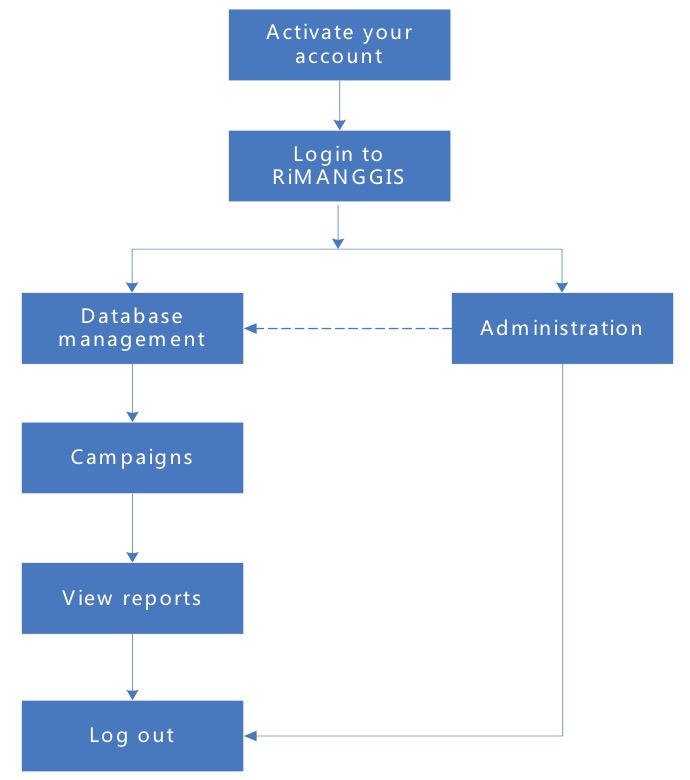 Step1. Firstly you need to activate and log in to RiMANNGIS.
Step2. System user and super user need to finish administration settings.
Step3. Users can manage granted databases
- Import customer records
- Set properties and tags
- Edit/delete/export customer records
- View dashboard data
Step4:Users can create and manage campaigns in databases.
- Create and manage multiple channel campaigns.
- Create and manage Email campaigns.
- Create and manage A/B split campaigns.
- Create and manage automation campaigns.
Step5: Users can view statistical reports in databases.
- View independent Multiple Channel Campaign reports, Email and A/B Split Test Campaign reports, Automation.
- Create and manage demographic reports.
- View delivery status.
Step6: Users need to logout from RiMANGGIS for security when they don’t need to use RiMANGGIS.