About API keys
API Keys function is provided to super user to create and manage API keys. RiMANGGIS configures API function for system users who need to develop interface applications with RiMANGGIS.
The API key of RiMANGGIS is a character string code for users to access and invoke granted data in RiMANGGIS database for API interface application development. Every API key is unique and can be configured with multiple databases, which means users can use the issued API key to access and invoke the data of configured databases.
Only system user or super user can create API keys for users.
Manage API keys
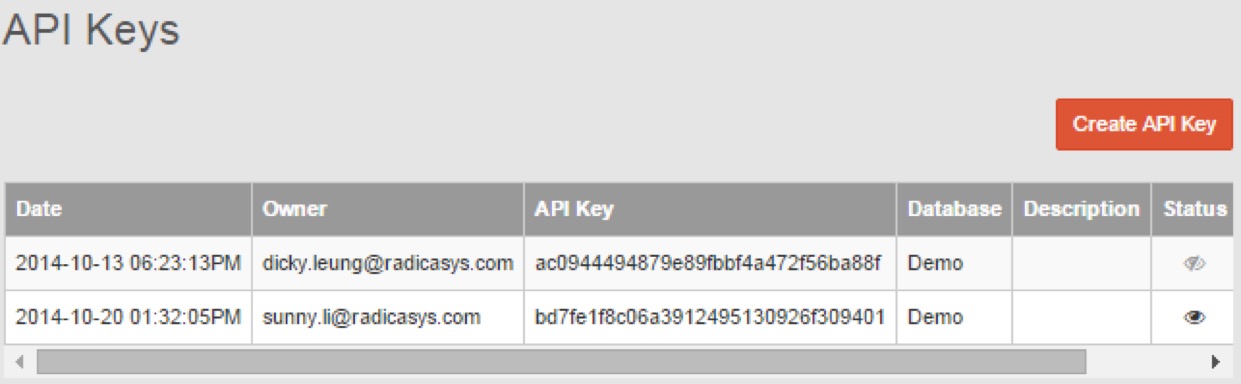
Click API keys in administration menu to enter API keys management page. You can view all generated API keys in RiMANGGIS.
Create API keys
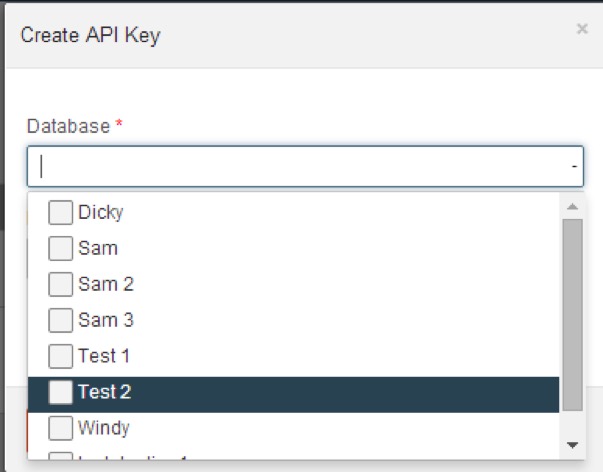
The window for creating API keys will pop up after you click ‘Create API Key’.
- You can select the database which the users need to acce
- Add description for the API key if necessary.
- Click OK to create a new API key.
All the created API keys are sequenced by the date of creation in ascending order, the latest created key will display in the last row.
Edit API keys
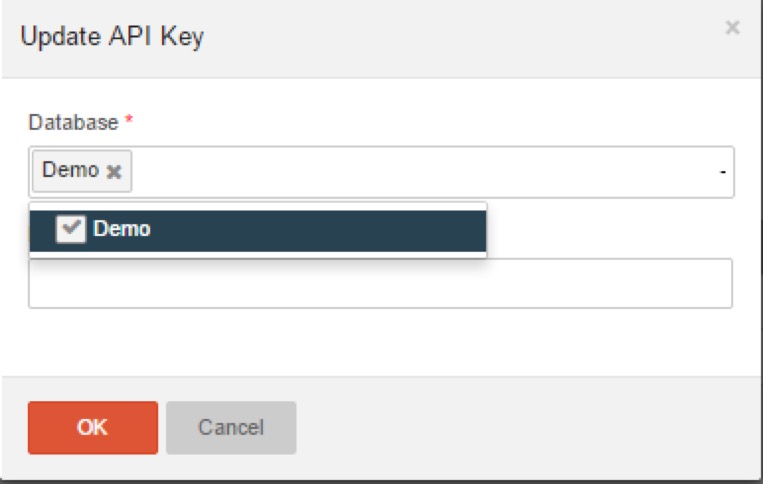
Click  to change the database configuration of API keys.
- Reselect the database
- Modify description information if necessary.
- Click OK to update configuration.
Activate and deactivate API keys
You can click  to activate or deactivate API keys. The deactivated API keys is invalid and cannot be used for API development until it is activated. The status column indicates the status of API keys.
Delete API keys
You can click  to delete an API key. Following indication box will pop up to remind you to confirm your operation. You need to check the information box and click OK to finish deletion.