
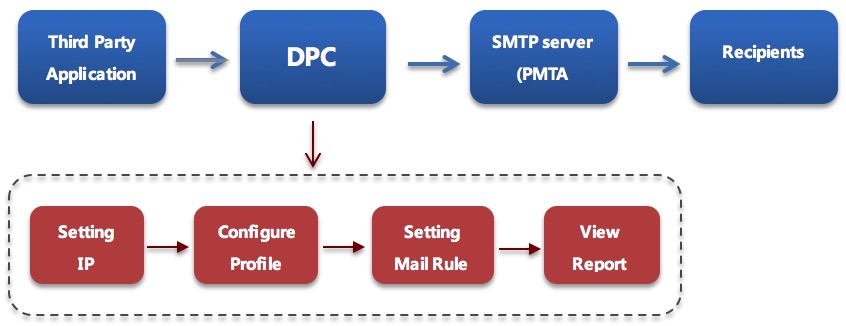
Delivery Performance Center (short for DPC) is a functional unit integrated in RiMANGGIS that allows third party application to send email through it via SMTP interface or Restful API. With DPC function, users can define profile and mail rule to control mail transfer policy, track and retrieve statistic data of emails and recipient activites including bounce, open, click. It plays roles of outgoing mail server and data recording and control center to help you to manage your email sending policy and data tracking rule effectively.
The following information is DPC API and SMTP address:
API address: https://api.dpc.rimanggis.com/dpc_api/
SMTP address: smtp.dpc.rimanggis.com port: 25
The DPC consists of four functional tabs: Profile, Mail rule, IP Address and Report.
DPC Work Flow
When the DPC receives an email sent from third party application via smtp server, firstly it will split the email content into several parts of information such as email header and subject name, sender name and email, URL links information, and then retrieve the corresponding information required by mail rule, finally it will process the email according to mail rule and profile configuration preset by users.
Profile Configuration
The profile is used to configure the mail processing policy, manage bounce emails and define tracking options.
- Mail processing policy: accept or reject emails. For ‘accept’ option, emails will be stored in DPC database and then transferred to SMTP service, finally emails will be sent to recipients. For ‘reject’ option, emails will be merely stored in DPC database and will not be sent to recipients.
- House keeping policy: it is used to configure the email valid storage time period.
- Remove custom header: DPC has defined a customized mail header‘X-Dpc-xxx’, if you enable this option, the customized header will be removed from email header before delivering to recipients.
- Bounce management: Enable or disable bounce management on the email. When the DPC function is enabled for a user, the user account will be configured with a DPC bounce email address. When the bounce management is enabled, DPC will set or rewrite the return path of the email to the user’s DPC bounce email address so that all emails relayed with this profile will have their bounce status captured, and reported.
- Activity tracking: it is used to configure the data tracking options including open and click-through activities. For click through tracking, you can choose to track all URL links in emails automatically or manually configure rules to track specific URL links.
Mail Rule
The mail rule is used to set the matching criteria which will be applied to a profile. A mail rule can be assigned with multiple criteria and a target mail process profile. When an incoming email matches criteria of a mail rule, it will be related with the target profile assigned.
Criteria and matching method
You can set mail rule by seven criteria: sender name, sender email, reply-to name, reply-to email, return path email, subject line, any email header.
The matching method of each criterion include following options:
- Equals: the specific email content must completely match the preset text information of mail rule criteria.
- RegExp (regular expression): the specific email content must match the preset character string rule of mail rule criteria.
- Start with: the first several characters included in specific email content must match the preset text information of mail rule creteia.
- End with: the last few several characters included in specific email content must match the preset text information of mail rule creteia.
- Contains: the specific email content must include the preset text information of mail rule creteia.
Matching email condition
It is used to set the relations of each mail criterion. Before setting mail rule criteria, users need to set the matching email conditions:
- Match all: emails must match all mail rule criteria.
- Match any: emails needs to match any one of mail rule criterion.
IP Address
By default, DPC allow any hosts to send the messages in. But user with DPC privilege can define the lists of hosts that are only allowed to transfer emails through DPC’s mail service interface (SMTP/Restful). The access control can be implemented in one of the following ways.
- IP. address (e.g. 203.168.0.10).
- IP. address range (e.g. 203.168.0.100-203.168.0.150).
Reports
Report Categories
According to users’ preset date range and parameters, DPC provides the following five reports:
- Summary report: provide all statistical summary data of campaigns and recipients’ activities.
- Open email report: provide all statistical data of open activities such as opened recipients’ email address, mail client, device and open times.
- Click through report: provide all statistical data of click activities such as URL link information, mail client and device.
- Bounce report: provice all statistical data of bounced emails such as bounced types and bounced email addresses.
Report Parameters Setting
Users can configure the following options to specify the type of emails which will be included in report data:
- By profile: users can choose a single email or multiple profiles to specify emails.
- By date: users can set date range to specify emails. The date range options include campaign in queue time, campaign send time.
- By email header: users can set email header value to specify emails. With this option, user can find emails with specific email header value (case insensitive exact match). When multiple email header value options are provided, user can choose to match emails against ALL or ANY of the value options.
- By subject line: users can specify subject to find emails to be included in report. When specified, only emails with the specified subject line will be referenced.
- BY sender name or sender emai: users can specify sender name or sender address to find emails to be included in reports. When specified, only email with sender name or email address equals to the specified email address will be referenced.
- By reply-to name or reply-to email: users can specify reply-to name or email address. When specified, only email with reply-to name or reply-to email address equals to the specified email address will be referenced.
- By return path: Users can specify the corresponding bounce email address. When specified, only email with bounce email address equals to the specified email address will be referenced.
- By action time (optional for open and click data report): users can specify emails by the two options of action time range: ‘cut off date’ and ‘days after email sent’. For ‘cut off date’ option, when specified, only activities that happened before the specified date will be referenced. For ‘Days after Email Sent’ option, when specified, only activities that happened within the specified number days after email is sent will be referenced.